

Quick Reference - Message categories and their common types:
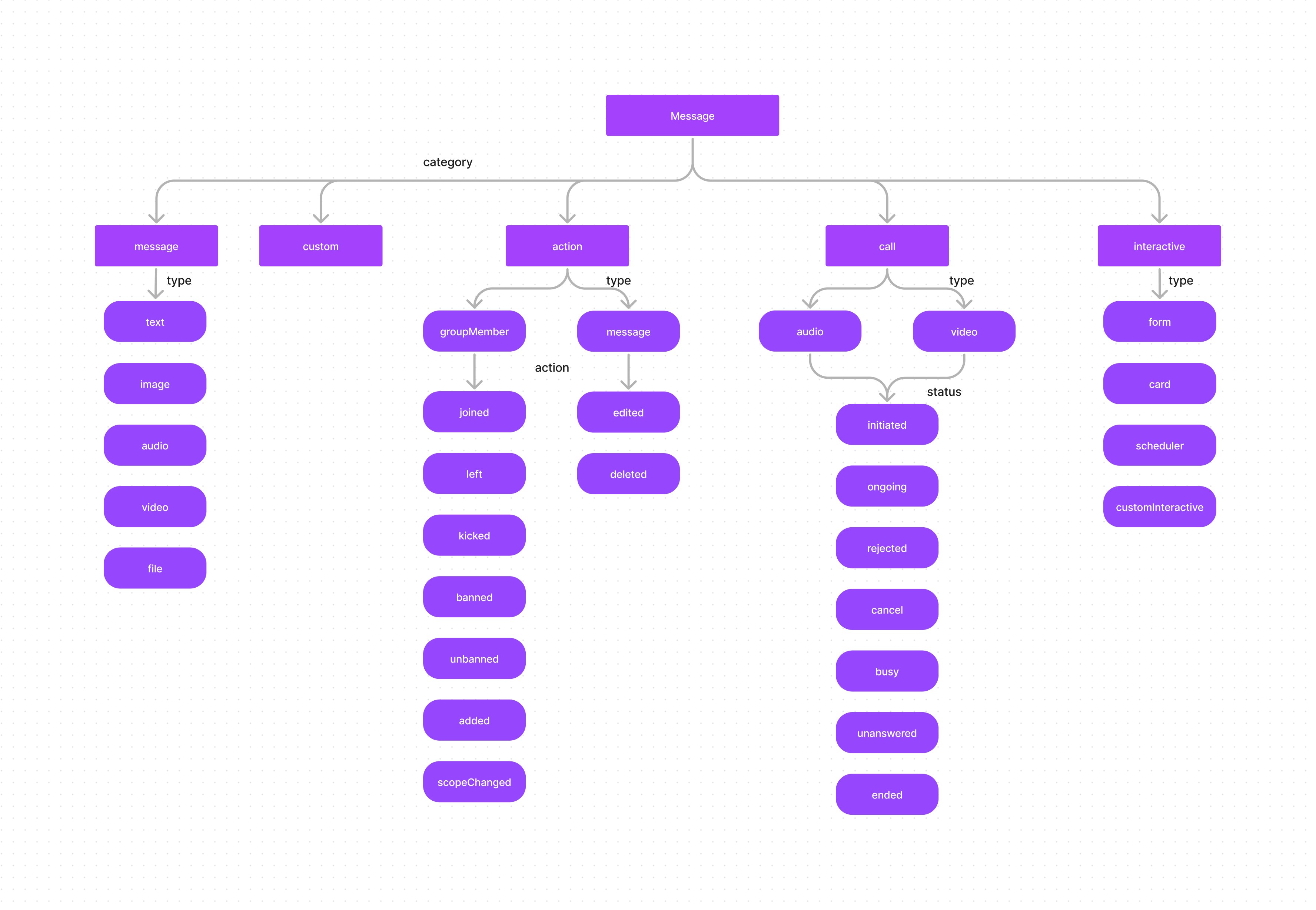
- Message
- Custom
- Action
- Call
- Interactive
Message
A message belonging to the categorymessage can be classified into one of the following types:
| Type | Description |
|---|---|
| text | A plain text message |
| image | An image message |
| video | A video message |
| audio | An audio message |
| file | A file message |
Custom
In the case of messages that belong to thecustom category, there are no predefined types. Custom messages can be used by developers to send messages that do not fit in the default category and types provided by CometChat. For messages with the category custom, the developers can set their own type to uniquely identify the custom message.
A good example of a custom message would be sharing location coordinates. In this case, the developer can decide to use the custom message with type set to location.
Interactive
An InteractiveMessage is a specialized object that encapsulates an interactive unit within a chat message, such as an embedded form that users can fill out directly within the chat interface. This enhances user engagement by making the chat experience more interactive and responsive to user input.| Type | Description |
|---|---|
| form | For interactive form messages |
| card | For interactive card messages |
| customInteractive | For custom interaction messages |
To learn more about Interactive messages, please refer to the Interactive Messages guide.
Action
Action messages are system-generated messages. Messages belonging to theaction category can further be classified into one of the below types:
| Type | Description |
|---|---|
| groupMember | Action performed on a group member |
| message | Action performed on a message |
action which determines the action that has been performed.
groupMember Actions
| Action | Description |
|---|---|
| joined | When a group member joins a group |
| left | When a group member leaves a group |
| kicked | When a group member is kicked from the group |
| banned | When a group member is banned from the group |
| unbanned | When a group member is unbanned from the group |
| added | When a user is added to the group |
| scopeChanged | When the scope of a group member is changed |
message Actions
| Action | Description |
|---|---|
| edited | When a message is edited |
| deleted | When a message is deleted |
Call
Messages with the categorycall are calling-related messages. These can belong to either one of the 2 types:
| Type | Description |
|---|---|
| audio | Audio call |
| video | Video call |
status that helps you determine the status of the call:
| Status | Description |
|---|---|
| initiated | When a call is initiated to a user/group |
| ongoing | When the receiver of the call has accepted the call |
| canceled | When the call has been canceled by the initiator of the call |
| rejected | When the call has been rejected by the receiver of the call |
| unanswered | When the call was not answered by the receiver |
| busy | When the receiver of the call was busy on another call |
| ended | When the call was successfully completed and ended by either party |